library(tidyverse)Join two data frames
Join
There are a series of join commands
- left_join, inner_join, right_join, full_join,
- semi_join, anti_join
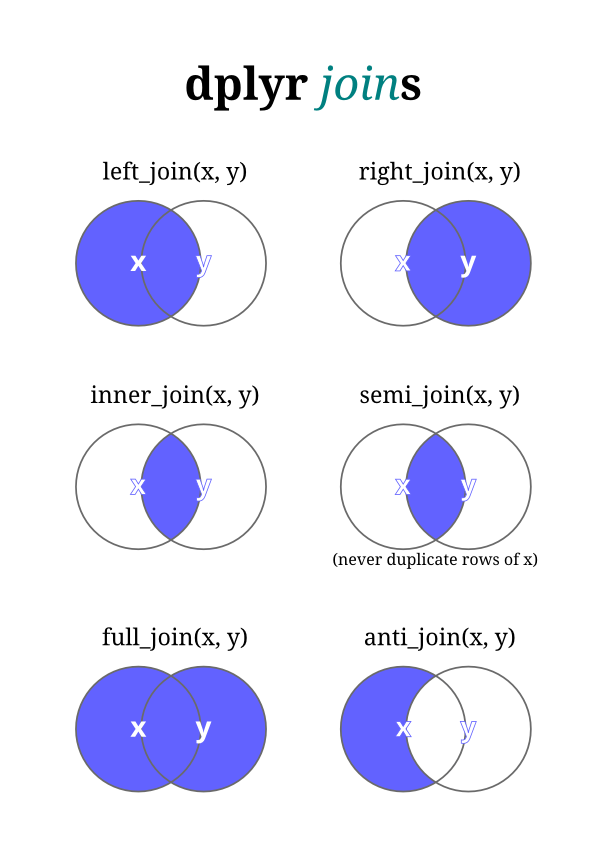
First let’s import the favorability ratings data from fivethirtyeight.com
data
These exercises use the following ggplot2 training datasets
- dplyr::starwars
- Data from fivethrityeight.org (modified)
fav_ratings <- read_csv("data/538_favorability_popularity.csv", skip = 11)
fav_ratingsstarwarsJoin on a key that is common across two data frames. For best results use a numeric key that promotes precision. Unfortunately our data frames do not have a numeric key to use as our join key. We’ll use an alphabetic key, name, and this will highlight what can go wrong. along with troubleshooting strategies.
The name variable is the key because it is common to both tables: fav_ratings and starwars.
fav_ratings  |>
  left_join(starwars, by = join_by(name))  |>
  arrange(desc(fav_rating))
anti_join
anti_join will determine data values that are in the left table and not the right table.
anti_join(fav_ratings, starwars) |> arrange(name)Joining with `by = join_by(name)`anti_join(starwars, fav_ratings) |> arrange(name)Joining with `by = join_by(name)`semi_join or inner_join
Join only the rows that match.
fav_ratings |>
  semi_join(starwars)
Joining with `by = join_by(name)`Regex
Regular expressions (regex) and {stringr} can be handy when manipulating character variables into join keys. We use regex when troubleshooting what is not matching. In other computatons we might also use regex for more sophisticated text manipulations, specifically for finding patterns in text.
- str_detect()
- str_to_lower()
- str_remove()
- str_trim()
- str_extract()
starwars %>%
  filter(str_detect(name,
                    regex("3p|palpatine|obi|amidala|leia|d2",
                          ignore_case = TRUE))) %>%
  arrange(name)
fav_ratings %>%
filter(str_detect(name,
regex("3p|palpatine|obi|amidala|leia|d2",
ignore_case = TRUE))) %>%
arrange(name)See Also
dplyr::bind_rows()
dplyr::bind_cols()